
To translate an invoice, keep the original beside a separate reading copy and check each translated label against its own value. An accurate description is not enough if a unit price moves to the total column or an unpaid amount becomes a payment received.
This guide helps you understand a short permitted invoice excerpt. The embedded text tool does not issue an invoice, update accounting records, validate tax treatment or approve a payment. For a complete document or a formal submission, first check the recipient’s requirements and your organization’s approved process.
- Keep an unchanged original and identify the fields you need to understand.
- Translate a short labelled passage in its actual language direction.
- Compare each identifier, amount, currency, date and payment status with the source.
Keep Labels Connected to Their Values
Start with the invoice number, item description, quantity, unit price and total as separate fields. Preserve the row a value belongs to. If copied text loses its columns, rebuild a clearly labelled working excerpt from the visible original before translation, then check that excerpt against the page.
Use only information your team permits in an external tool. Remove unnecessary personal or bank details from the working excerpt; keep any required reference mapping in your approved internal system. Do not use a translation to verify an unfamiliar sender or changed payment details. Confirm changed payment instructions through a contact channel you already trust, such as a known telephone number, and follow your payment-approval process. Do not use contact details supplied only in the change request to verify that request.
FBI/IC3 guidance on independently checking payment changes
Try a Fictional Spanish Invoice Excerpt
The following small exercise is author-written and fictional. Its identifiers, dates, amounts and tax example are practice data, not a real invoice, an observed JotMe result or a tax rate recommendation.
Factura DEMO-7314. Fecha de emisión: 10 de noviembre de 2026. Concepto: 2 cuadernos a 8,50 EUR cada uno. Subtotal: 17,00 EUR. IVA (21 %): 3,57 EUR. Total: 20,57 EUR. Estado: pendiente de pago. Vencimiento: 25 de noviembre de 2026.
- Set the source to Spanish and the target to English for this exercise. Choose the actual languages for your own excerpt.
- Paste the complete labelled passage. Translation starts automatically after you pause; there is no separate submit step.
- Keep the source visible and compare every field before copying the draft into your approved working document.
Check the remaining text allowance first. A new demo displays an initial 5,000-token allowance, and earlier use can leave less; tokens are not a fixed word count. Editing the source or changing a language can start another translation. Explanation notes may add interpretations, so use the original fields to confirm meaning.
Try it yourself
0 / 5,000 used · 5,000 left
Translation will appear here
Explanation
An explanation of translation choices appears here when your translation is ready.
Check the Amount, Currency and Payment Status Separately
For the exercise, a checked English draft should still describe two notebooks at 8.50 EUR each, a 17.00 EUR subtotal, a stated 21% tax of 3.57 EUR and a 20.57 EUR total. The status remains awaiting payment. These are author-written meaning checks against the Spanish source, not a prescribed or captured tool response.
Compare the Example’s Labels and Values
The following compact reference is an editorial comparison of the fictional Spanish source with English field labels. It is not a captured tool response. Keep labels, values and row associations together.
- Invoice reference: “Factura” → “Invoice” → DEMO-7314.
- Issue date: “Fecha de emisión” → “Issue date” → November 10, 2026.
- Quantity: “2 cuadernos” → “2 notebooks” → 2.
- Unit price: “8,50 EUR cada uno” → “8.50 EUR each” → 8.50 EUR per notebook.
- Subtotal: “Subtotal” → “Subtotal” → 17.00 EUR.
- Stated VAT: “IVA (21 %)” → “VAT (21%)” → 3.57 EUR. This is practice data, not a tax recommendation.
- Total: “Total” → “Total” → 20.57 EUR.
- Payment status: “pendiente de pago” → “pending payment” → not paid.
- Due date: “Vencimiento” → “Due date” → November 25, 2026.
- Reference: DEMO-7314 stays exactly the same; do not translate or shorten its characters.
- Line item: two notebooks, with 8.50 EUR as the price for each notebook, stay attached to the same description.
- Amounts: the subtotal, tax and total remain three different fields. A decimal comma can become a decimal point without changing the value.
- Currency: EUR stays EUR. Translation does not convert 20.57 EUR into another currency.
- Status: “pendiente de pago” means payment is pending; it must not become “paid.”
- Dates: November 10 is the issue date and November 25 is the due date in this fictional passage. Do not swap their roles or infer a payment date.
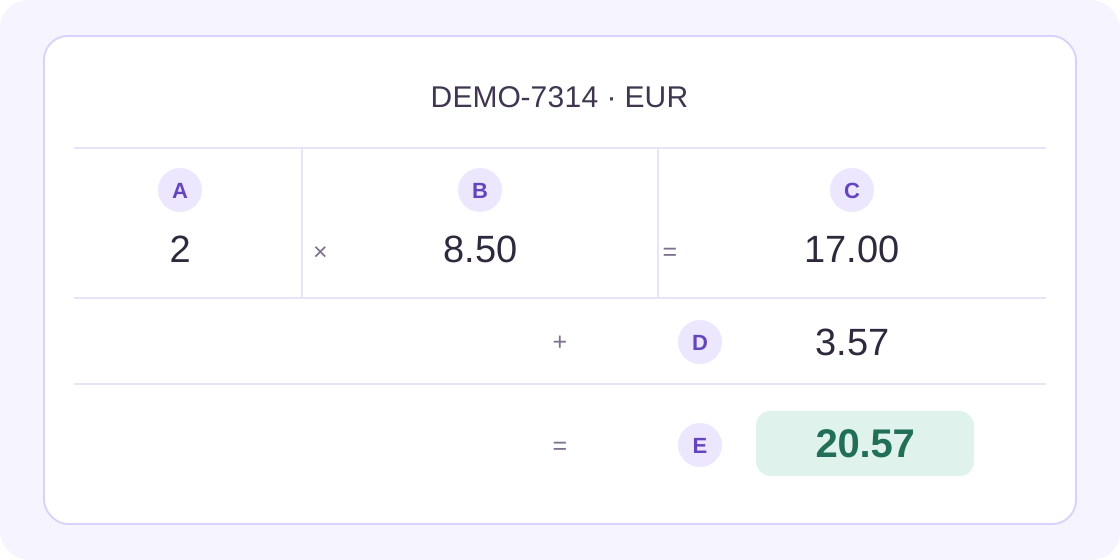
A quick arithmetic check can reveal that an amount was copied into the wrong place: this fictional example has 2 × 8.50 = 17.00, then 17.00 + 3.57 = 20.57. Check translation against the source’s stated values. If a real source does not reconcile, retain the original and ask its owner; do not silently repair the issued invoice or infer the correct tax treatment.
A separate fictional partial-payment example has “Total: 120,00 EUR; Pagado: 50,00 EUR; Saldo pendiente: 70,00 EUR.” Check invoice total 120.00 EUR, amount paid 50.00 EUR and amount remaining 70.00 EUR separately. The total must not become the remaining balance, and a partial payment must not become full settlement. These figures are an editorial exercise, not an observed translation or a claim about a real account.
Stripe documentation on distinct paid and remaining amounts
Preserve tax wording as well as numbers. “IVA incluido” means “VAT included”; “sin IVA” means “without VAT,” or “excluding VAT” when that matches the source context. Do not add tax again to an amount the source says already includes it. Retain the source’s stated amounts and ask its owner when the label is unclear; wording alone does not establish an exemption or the correct tax treatment.
Spain’s tax authority uses the wording “IVA incluido” in its invoice guidance
For a fictional adjustment, “Descuento: −5,00 EUR” becomes “Discount: −5.00 EUR.” Keep the minus sign, discount label and associated line. If a credit-note reference appears, retain it and confirm its role with the responsible owner. A reduction in an amount due does not by itself prove that money was refunded or received.
Stripe documentation on credit notes and refunds as distinct actions
Also check what a unit price applies to. The fictional line “2 cajas de 12 unidades a 8,50 EUR por caja” means two boxes, twelve units in each box and 8.50 EUR per box: a 17.00 EUR line amount before any other stated adjustments. Do not silently turn the price per box into a price for each individual unit.
Resolve Unclear Dates or Terms Before Using the Copy
A date such as 04/05/2026 is ambiguous without the source convention. Ask the issuer or check the approved record instead of choosing a familiar month/day order. Writing an unambiguous month name is useful only after the underlying date is confirmed. Keep issue, supply, due and paid dates distinct when they appear.
Use your team’s approved terms for descriptions and tax labels. Keep model numbers, invoice references and other identifiers exact. If a label or negative amount is unclear, record the uncertainty in a separate internal working note rather than inserting an explanation into the invoice as though the issuer wrote it.
For an example of why field roles matter, the UK government’s invoice overview lists the supply date, invoice date, amounts charged, applicable VAT amount and total owed separately. That UK checklist is not a rule for every country or a substitute for the requirements that apply to your document.
GOV.UK overview of invoice fields
Choose Selectable Text or a Permitted Image
Use Text Translation for a short passage you can copy accurately. If you have only an invoice photo or screenshot, the separate Image Translation tool can help you read visible wording. Choose the target language, upload a supported image within the displayed limit, then click Translate image. Its source language is detected automatically.
The image tool currently displays a 4MB limit and accepts PNG, JPEG, WEBP and static GIF. It has a separate allowance. Preserve complete rows and column headings, redact unnecessary details inside the image, and inspect the exported image before uploading it. Compare recognized digits, decimal marks, currency labels and minus signs with the original; a plausible-looking number can still be wrong.
- Short copied excerpt: use Text Translation and compare every field with the unchanged source.
- Permitted invoice photo: use the separate Image Translation tool and check recognized rows, digits and signs.
- Complete file: use Document Translation only if the current tool accepts its format and the file meets the displayed limits. Confirm recipient requirements, retain the original and review the returned file before relying on it. If processing fails or the result is unusable, stop and use your approved alternative; a short excerpt is not a substitute for a complete-file translation.
For a document that contains scanned pages, use the separate scanned-PDF guide to distinguish page images from selectable text. Pasting a short excerpt here does not translate an entire file or preserve its invoice layout.
Guide to translating a scanned PDF
Save a Reviewed Reading Copy
Keep the source and checked draft together in your approved workspace, clearly identifying the draft as a translation for reference. Make wording corrections in that editable working copy. Instructions added to the translator’s source box do not directly edit its displayed result and may trigger a new translation.
On the companion reading copy, you can use a handover label such as: “Translation for reference | Invoice DEMO-7314 | Spanish → English | Checked on [date] | Checked by [name] | Open questions: [items].” Keep that label off the issued original and retain the link to the approved source. It records the review; it does not certify or authenticate the invoice.
Before anyone relies on the copy, have the meaning checked by someone who can compare both languages and have the responsible owner confirm the underlying transaction details. Follow the normal accounting and payment process. Translation alone does not authenticate an invoice, resolve a discrepancy or establish that a balance has been paid.
Invoice Translation FAQs
How do I translate an invoice into English?
Use a permitted labelled excerpt, select its actual source language and English as the target, then compare the draft with the original. Check references, item rows, quantities, amounts, currency, dates and payment status separately. Keep the unchanged source with the reviewed reading copy.
Should the translator change decimal commas to points?
The written format can differ between languages while the value stays the same: 20,57 EUR and 20.57 EUR represent the same amount. Check the value, currency and field role against the source. Keep exact identifiers unchanged and record any required formatting convention in your working process. As a formatting example, 1.234,56 EUR and 1,234.56 EUR can represent the same value under their respective conventions. If the source convention is unclear, keep its notation and ask for clarification; do not replace every comma or period automatically.
Does invoice translation convert the currency?
Translating the wording is separate from converting an amount. In the fictional example, the currency remains EUR and the total remains 20.57 EUR. Do not insert an exchange rate or change the transaction values merely because the target language uses another currency.
Can I translate an invoice photo?
Use the separate Image Translation tool for a permitted clear image. Select the target, upload PNG, JPEG, WEBP or static GIF within the displayed 4MB limit, then click Translate image. Check its separate allowance, retain complete rows and headings, redact unnecessary details and compare recognized numbers with the original.
What if the invoice date or total is unclear?
Keep the original and ask the issuer or responsible owner to clarify it. Do not guess a date convention, silently correct a total or infer tax treatment from a translated sentence. Record unresolved questions in a separate internal note. For example, total 120.00 EUR, paid 50.00 EUR and remaining 70.00 EUR are three separate facts; partial payment is not full settlement. Preserve a negative adjustment’s sign and label rather than calling it a refund received.
Can this excerpt replace an invoice or an official translation?
This workflow produces a short reading draft. It does not issue or amend an invoice, update accounting records or approve payment. For a complete document or formal submission, confirm the receiving party’s requirements and use the approved process; do not assume an excerpt meets them.