To translate a newsletter for another audience, prepare the source copy, translate each plain-text field, then review the assembled email before sending. Check the subject and preview text as well as the body: a fluent paragraph is little help if the button promises a different action or leads to the wrong page.
- Fix the audience, language, offer and source version before translating.
- Translate a short, coherent body passage and compare its facts with the original.
- Review every remaining field and link in the actual newsletter template, then send a controlled test.
Choose Between Reading a Newsletter and Preparing a New Edition
If you only want to understand a received newsletter, use a reading method that suits your email client or the sender’s web version. Our email guide covers Gmail, Outlook and replies. Preparing a translated edition for subscribers is a different task: you need reviewed copy in each field, working destinations and the correct audience in your sending platform.
This walkthrough prepares short text for an editor. It uses the existing JotMe Text Translation demo for one body passage. Keep your approved newsletter template and a separate field checklist open; the demo does not connect to a mailing account, select recipients, edit an HTML campaign or send a newsletter.
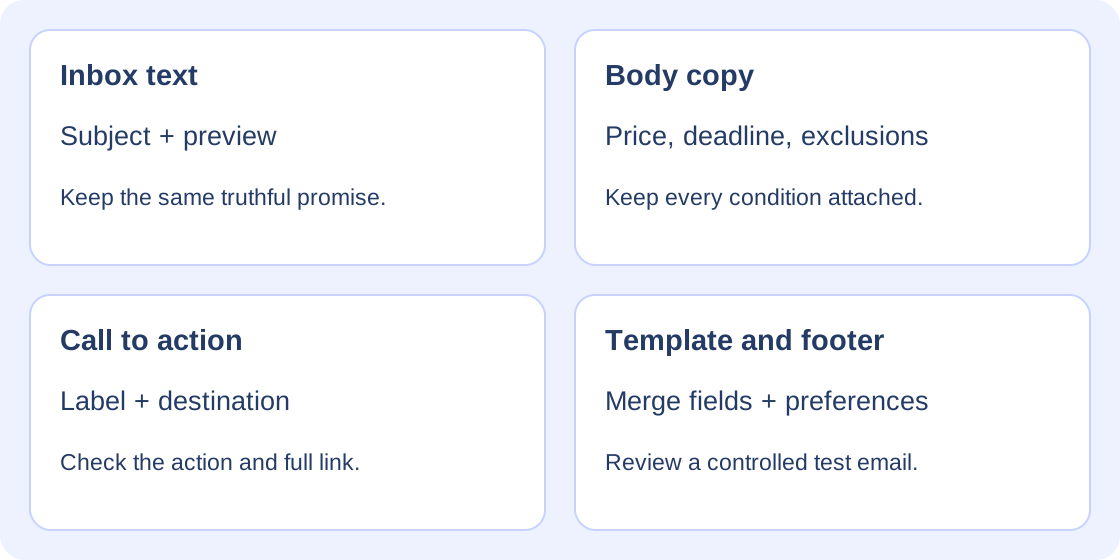
- Subject: the promise readers see in the inbox.
- Preview text: the supporting line your sending platform and email client display.
- Body: the complete message, including eligibility, dates, prices and exclusions.
- Call to action: both the button wording and its actual destination.
- Template and footer: merge fields, sender details, language preferences and subscription controls.
Try One Fictional Newsletter Passage
Bruma Studio and its workshop are invented examples. The reserved example.org address is not a real booking page. Use text you are permitted to share; keep subscriber lists, personal details, private campaign links, tracking identifiers and live unsubscribe tokens out of the translator.
Bruma Studio abre la reserva anticipada solo para socios hasta el 3 de diciembre de 2026 a las 18:00 UTC. El taller cuesta 24 EUR. Los materiales no están incluidos. Consultar las plazas en https://example.org/taller?edicion=invierno#plazas no confirma una reserva. Cancelar una reserva no te da de baja del boletín.
- Select Spanish as the source language and English as the target for this exercise.
- Paste the complete plain-text passage. Translation starts automatically after you pause typing; there is no separate submit button.
- Keep the source alongside the response. Save an editable draft before making your own changes.
Check the allowance displayed in the demo first. A fresh text demo starts with 5,000 tokens, not 5,000 words; previous use can leave less. Editing the text or changing languages can start another request. Treat the explanation as a suggestion about wording, then compare the translation with the source.
Try it yourself
0 / 5,000 used · 5,000 left
Translation will appear here
Explanation
An explanation of translation choices appears here when your translation is ready.
Compare the Recorded English Draft
On November 17, 2026, Pacific time, a direct request to the live text service returned the following English draft for exactly the Spanish passage above. It charged 206 tokens and reported 4,794 remaining. This dated result covers one plain-text body passage; later requests may use different words or show a different balance.
Bruma Studio opens advance booking only for members until December 3, 2026, at 18:00 UTC. The workshop costs 24 EUR. Materials are not included. Checking availability at https://example.org/taller?edicion=invierno#plazas does not confirm a reservation. Canceling a reservation does not unsubscribe you from the newsletter.
The returned body kept Bruma Studio, the members-only early-booking period, the deadline and UTC time, the 24 EUR price, the materials exclusion, the exact URL and the two separate actions: viewing availability is not a confirmed reservation, and canceling a reservation is not unsubscribing. The service’s explanation described its wording choices; it did not check the offer against a business record or test the link.
Check the Offer Before Polishing the Style
- Eligibility: early booking is only for members. Do not broaden that to every subscriber.
- Date and time: December 3, 2026 at 18:00 UTC is the early-booking deadline. The source does not say the workshop starts then, or that all booking closes then.
- Amount: keep 24 EUR. A language change does not authorize currency conversion, a different price or an invented tax statement.
- Exclusion: materials are not included. Do not turn that into free materials or assume how they can be obtained.
- Action: checking available places does not confirm a reservation. Keep booking cancellation and newsletter subscription separate.
Translate the Subject and Preview Text Separately
Use a source subject and preview line that match the approved body. For this invented issue, the Spanish subject could be “Reserva anticipada para socios: taller de invierno,” with preview text “Consulta las plazas; materiales no incluidos.” These are additional editorial examples, not part of the recorded service result above.
- A possible English subject is “Members’ early booking: winter workshop.” It retains the limited audience without inventing urgency or scarcity.
- A possible English preview is “View available places; materials not included.” It supports the body without claiming a place is reserved.
These English lines are editorial suggestions to review for the intended readers. Choose appropriate register and regional wording without changing the offer. Display space varies by template, device and email client, so inspect the actual inbox preview. Shorten deliberately if needed, keeping essential conditions clear in the body rather than replacing them with a stronger promise. For this working brief, use British English in separately edited copy; preserve the dated returned body exactly as recorded. Enter the reviewed preview translation in the platform’s actual preview-text field. If it is left unset, a client may pull unintended opening content such as a view-in-browser line. Inspect the received snippet, including its language, rather than assuming the field was used.
Check the Button and Its Destination as One Pair
The source action “Ver plazas” can be expressed as “View available places” in this example. That does not mean “Confirm my booking” or “Pay now.” Translate the visible button label separately, then check that its destination performs the same reviewed action. The text demo does not create or test a working campaign button. “Check availability” is a shorter editorial alternative for this workshop. Choose the owner-approved wording and a consistent booking term in edited copy; these choices do not change the recorded service output.
- Record each approved destination next to its source label. Compare the visible address and the underlying href, including query parameters and the fragment after #.
- Keep https://example.org/taller?edicion=invierno#plazas unchanged in this exercise. For a real multilingual campaign, use the destination approved for that language; do not guess a translated URL path.
- Use a controlled test to confirm the assembled button opens the intended page and that the page’s language and offer agree with the email. A translated label alone does not localize its landing page. Distinguish the approved destination from any platform-generated tracking address: Mailchimp can wrap links in redirects. Check the final page’s language, offer and intended fragment after redirects. Its automated Link Checker does not validate anchor links, so retain the manual check. Keep private tracking links outside JotMe.
Keep Template Fields and Subscription Controls in Their Own Workflow
Translate ordinary copy as separate plain-text fields. Keep merge tags such as {{nombre}}, HTML, link destinations and platform control tokens in the approved template, outside this text workflow. Do not translate a variable’s spelling or assume JotMe protects template syntax. If the platform uses a different field name or fallback for another audience, have the template owner make and test that change there.
Review sender details and the footer’s human-readable wording for the selected audience while retaining the platform’s approved subscription and preference controls. Follow the sending platform’s own recipient-testing procedure; do not expose a real subscriber’s private unsubscribe link in a translation request. Translating the body does not configure the sending platform’s default language or establish permission to send. In Mailchimp, ordinary test emails do not populate contact-specific merge tags, even when the test address is a contact. Use preview with live merge information or a controlled live send restricted to designated test contacts, and check both a populated name and its missing-name fallback.
Ordinary text requests are separate, so do not assume the next field remembers the last one. Keep an approved terminology list beside the draft; it is an external editorial aid, not a protected glossary feature. For a long newsletter, use coherent plain-text sections, mark any repeated context in working notes, then compare the complete reassembled copy with the full source. Record the audience’s actual language data or preference, not a guess based on names. Test an intended-language contact, a different-language contact and one with no preference, with the fallback approved in advance. Conditional body content does not establish that the subject and preview changed too: set and test those inbox fields separately. Use separate language campaigns when the platform cannot provide the reviewed edition consistently; none of this is configured in JotMe.
Test the Assembled Newsletter Before Sending
- Compare the subject, preview, body and button wording with the same approved source version. Resolve contradictions or ambiguous source details with the content owner.
- Check names, amounts, dates, time zones, exclusions and the distinction between each action. A back-translation may raise a question; it is not proof of accuracy.
- Inspect the actual email template for missing or duplicated sections, broken characters, text overflow, image text and accessible alternative text. For the workshop, the price, deadline and materials exclusion must still be available when images are hidden; check meaningful alternative text in context. A translated screenshot does not update a live image or its alt text.
- Use the platform-appropriate test for visible and underlying links, final destinations after tracking redirects, populated merge fields, missing-field fallbacks and footer controls; an ordinary test message may not exercise contact-specific data.
- Have a competent bilingual reviewer check the complete message for meaning and audience-appropriate language. Use qualified review for sensitive or regulated statements.
- Keep identifiable reviewed versions, confirm the intended language audience and sending settings in the separate platform, and recheck affected fields after any source or translation change. Review any outgoing plain-text companion for the same language, offer, exclusions and usable URLs; it is separate from the plain-text passages entered into the translator. For right-to-left editions, the template owner should use a supported layout, set language and direction separately, and inspect mixed-script names, URLs, numbers and punctuation in actual email clients.
The recorded example demonstrates a short text draft, not a validated HTML template, multi-field import or campaign send. Keep the translation and final email review as distinct steps; no open-rate, deliverability or conversion outcome is promised. A compact manual reference for this issue is: subject “Reserva anticipada para socios: taller de invierno” → “Members’ early booking: winter workshop” (members-only); preview “Consulta las plazas; materiales no incluidos” → “Check availability; materials not included” (no confirmed place); button “Ver plazas” → “Check availability” (view, not book). This is an editorial reference, not a multi-field demo input. For an editorial newsletter, “Lee el informe completo” can become “Read the full report”: point to the approved language version and keep the source summary’s qualifications. The workshop remains the main example.
Open Text Translation for a permitted short passage.
If a permitted newsletter extract is only in a screenshot, use the separate Image Translation tool. Choose the target language, upload a readable PNG, JPEG, WEBP or static GIF within the displayed 4 MB limit, then click Translate image. Source-language detection is automatic and its allowance is separate. Redact unnecessary personal data in the exported image, keep full lines visible and compare recognized text with the original; this does not recover a live email’s underlying buttons or links.
Open Image Translation for a clear permitted screenshot.
Read the email guide for Gmail, Outlook and replies.
Use the product-description guide to check a separate product passage.
Newsletter Translation FAQ
How do I translate a newsletter into English?
Start with approved source copy and the intended audience. In Text Translation, choose the source language and English, then translate a short, coherent plain-text body passage. Compare the result with the source, translate the other ordinary text fields separately and review the complete newsletter in the sending platform before a controlled test.
Can I translate the whole newsletter template at once?
This walkthrough covers separate plain-text fields and one recorded body passage. Keep labelled multi-field structures, HTML, merge tags, private links and control tokens in the approved template workflow. The worked result does not establish reliable template translation or an import into a mailing platform.
Should the subject line be translated word for word?
Preserve its truthful promise while choosing natural wording for the intended readers. Review the subject and preview together with the body, retaining audience restrictions and avoiding invented urgency or benefits. Check their actual display in the email client and template rather than relying on a universal character limit. Enter and test the actual preview-text field; a missing custom preview can expose unintended opening content. Conditional body language rules do not establish that the inbox fields changed.
Does translating a button also translate its link?
Treat the visible label and underlying destination as a reviewed pair. Keep the approved address, query parameters and fragment, or use a separately approved language-specific destination. Verify the assembled button and landing page in a controlled test; translating its wording does not create, translate or test the destination. A sending platform may wrap the approved destination in a tracking redirect. Check the final language, offer and fragment after redirecting, and keep private tracking URLs outside the translator.
Can I translate a screenshot of a newsletter?
Use the separate Image Translation tool for a readable image you may share. Select the target language, upload PNG, JPEG, WEBP or static GIF within the displayed 4 MB limit, then click Translate image. Its source detection is automatic and allowance separate. Compare recognized text with the original and redact unnecessary personal data; an image does not expose the email’s underlying links.
Will JotMe send the translated newsletter to my subscribers?
This text workflow prepares wording. Assemble and test it in your separate sending platform, retain approved template and footer controls, confirm the intended language audience and settings, and obtain the appropriate content review before sending. Recheck changed fields and preserve identifiable final versions; translation does not establish sending permission or promise campaign performance. Follow the platform’s actual merge-field testing process, approve and test language fallbacks, review the outgoing plain-text companion, and have the template owner check language and direction separately for right-to-left editions.